Real-Time Speech Transcription That Runs Locally On Your Laptop — No Whisper Server Deployment Required
For most AI practitioners, deploying a Whisper service is the first choice for speech transcription — but it consumes server resources, and transferring audio data introduces privacy risks. Now Liquid AI's LFM2-Audio-1.5B can run real-time transcription locally on an ordinary laptop alongside llama.cpp. No internet connection is required at any step, eliminating the risk of data leakage. Full setup steps and extended use cases are included below.
Engineer Pau Labarta Bajo recently shared this practical tip for AI practitioners: you don't have to deploy Whisper on a server just to get speech transcription done.
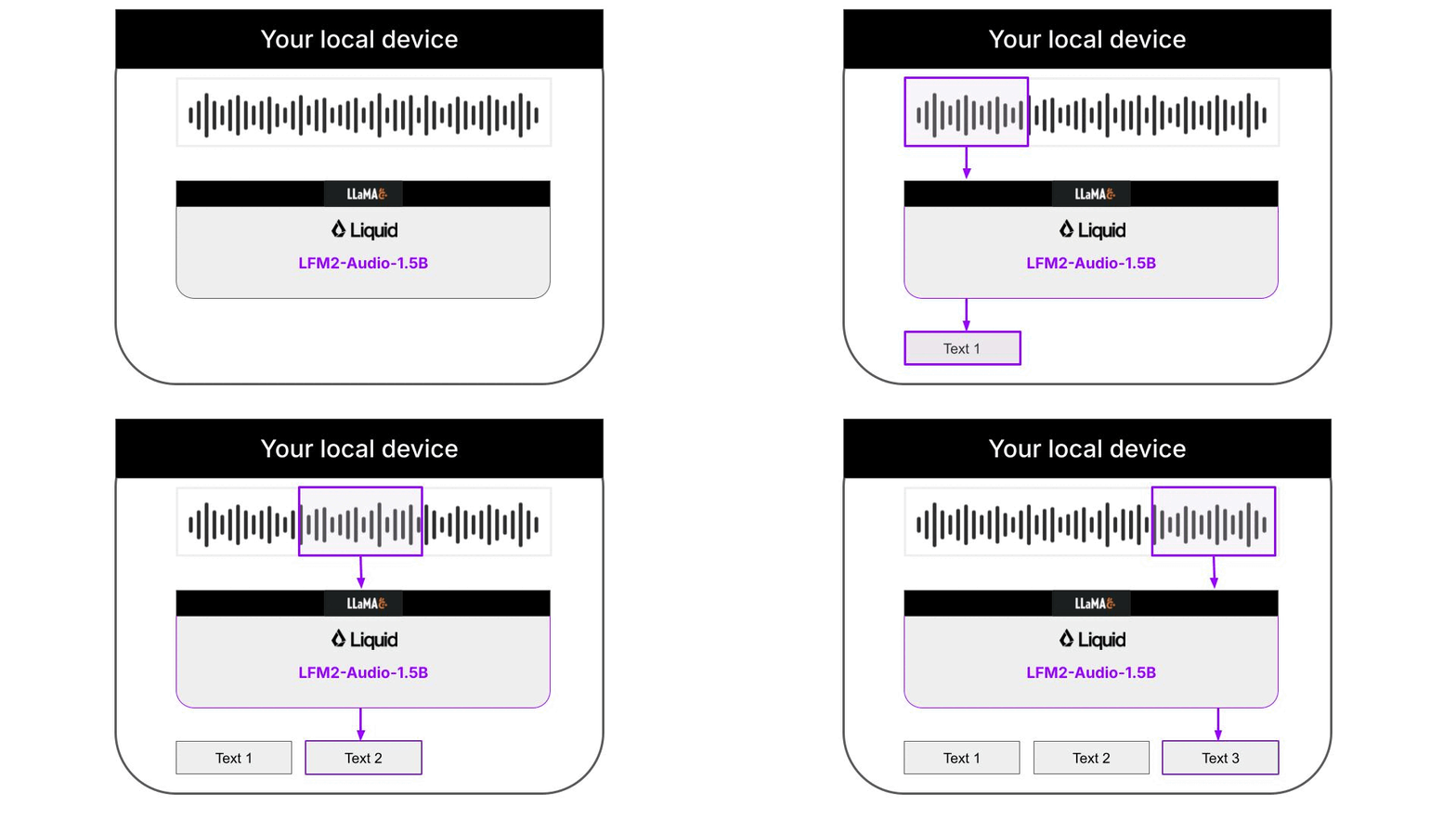
Liquid AI's LFM2-Audio-1.5B model, paired with the llama.cpp inference framework, enables real-time speech transcription on a regular laptop. The entire process works offline, with all audio and transcription results stored only locally and never uploaded to any external servers. The full workflow architecture is shown below:
### Quick Start Guide
No manual dependency compilation is required for this setup; the official team has already prepared an automated script. Just follow these four steps:
1. Clone the official example repository
```
git clone https://github.com/Liquid4All/cookbook.git
cd cookbook/examples/audio-transcription-cli
```
2. Install the uv package manager (skip this step if you already have it on your system)
**macOS/Linux:**
```
curl -LsSf https://astral.sh/uv/install.sh | sh
```
**Windows:**
```
powershell -ExecutionPolicy ByPass -c "irm https://astral.sh/uv/install.ps1 | iex"
```
3. Download test audio samples
```
uv run download_audio_samples.py
```
4. Run the transcription command to see real-time results in your console. Add the `--play-audio` flag to play the audio synchronously
```
uv run transcribe --audio './audio-samples/barackobamafederalplaza.mp3' --play-audio
```
### Supported Platforms
The pre-compiled official packages currently support four platforms:
- android-arm64
- macos-arm64
- ubuntu-arm64
- ubuntu-x64
Users on other platforms will need to wait for official compatibility updates.
### Extended Use Cases
This solution uses llama.cpp under the hood, an open-source lightweight inference framework written in C++. It delivers much higher runtime efficiency than common libraries like PyTorch and transformers, making it ideal for edge deployment. The CLI will automatically download the platform-adapted version of llama.cpp, so users don't need to handle manual compilation.
Beyond basic automatic speech recognition (ASR), LFM2-Audio-1.5B also supports text-to-speech (TTS), and even allows custom voice styling. The official team has provided command-line examples for three core use cases:
1. Speech Transcription
```
# Audio to Speech Recognition (ASR)
./llama-lfm2-audio \
-m $CKPT/LFM2-Audio-1.5B-Q8_0.gguf \
--mmproj $CKPT/mmproj-audioencoder-LFM2-Audio-1.5B-Q8_0.gguf \
-mv $CKPT/audiodecoder-LFM2-Audio-1.5B-Q8_0.gguf \
-sys "Perform ASR." \
--audio $INPUT_WAV
```
2. Basic Text-to-Speech
```
# Text To Speech (TTS)
./llama-lfm2-audio \
-m $CKPT/LFM2-Audio-1.5B-Q8_0.gguf \
--mmproj $CKPT/mmproj-audioencoder-LFM2-Audio-1.5B-Q8_0.gguf \
-mv $CKPT/audiodecoder-LFM2-Audio-1.5B-Q8_0.gguf \
-sys "Perform TTS." \
-p "My name is Pau Labarta Bajo and I love AI" \
--output $OUTPUT_WAV
```
3. Custom-Style Text-to-Speech
```
./llama-lfm2-audio \
-m $CKPT/LFM2-Audio-1.5B-Q8_0.gguf \
--mmproj $CKPT/mmproj-audioencoder-LFM2-Audio-1.5B-Q8_0.gguf \
-mv $CKPT/audiodecoder-LFM2-Audio-1.5B-Q8_0.gguf \
-sys "Perform TTS.
Use the following voice: A male speaker delivers a very expressive and animated speech, with a low-pitch voice and a slightly close-sounding tone. The recording carries a slight background noise." \
-p "What is your name man?" \
--output $OUTPUT_WAV
```
### Quality Optimization
Directly output transcription text may sometimes have incorrect sentence breaks and ungrammatical phrasing due to overlapping audio chunking. The official team provides a local optimization solution: pair it with the smaller same-series LFM2-350M text model for post-processing cleanup. This two-step fully local workflow greatly improves transcription quality while remaining completely offline.
Full official documentation and the latest updates are available here: [Official Real-Time Audio Transcription Documentation](https://docs.liquid.ai/examples/laptop-examples/audio-to-text-in-real-time)
发布时间: 2026-05-23 00:01